Career Coach Dev

Early access · by V-Network Solutions

A resume written for each job, and a coach for every interview after it.

Career Coach Dev keeps your search in one place: each application and what comes next, a resume and cover letter shaped to each posting, practice before each interview, and a coach who knows your work and your week.

The organization that develops Career Coach Dev reads every request. If you're invited, the invitation comes by e-mail. Asking doesn't promise one.
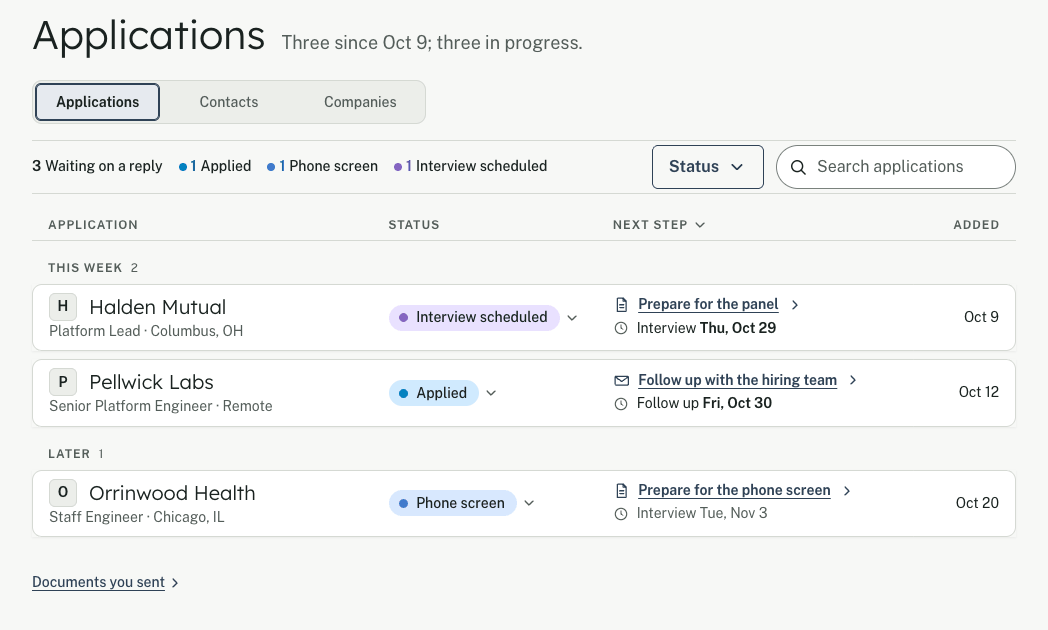
The Applications list of the invented account Jordan Example: three applications in progress. This week: Platform Lead at Halden Mutual, Interview scheduled, a panel interview on Thursday, Oct 29; Senior Platform Engineer at Pellwick Labs, Applied, follow up on Friday, Oct 30. Later: Staff Engineer at Orrinwood Health, Phone screen on Tuesday, Nov 3.
The Applications page, from the app itself. Jordan Example and the companies in it are invented.

Everything your search needs, in one place

One career record

One career record feeds every page, so nothing is typed twice. The examples below use an invented account.

A resume for every posting

Shaped to what each job asks for, with a cover letter to match.
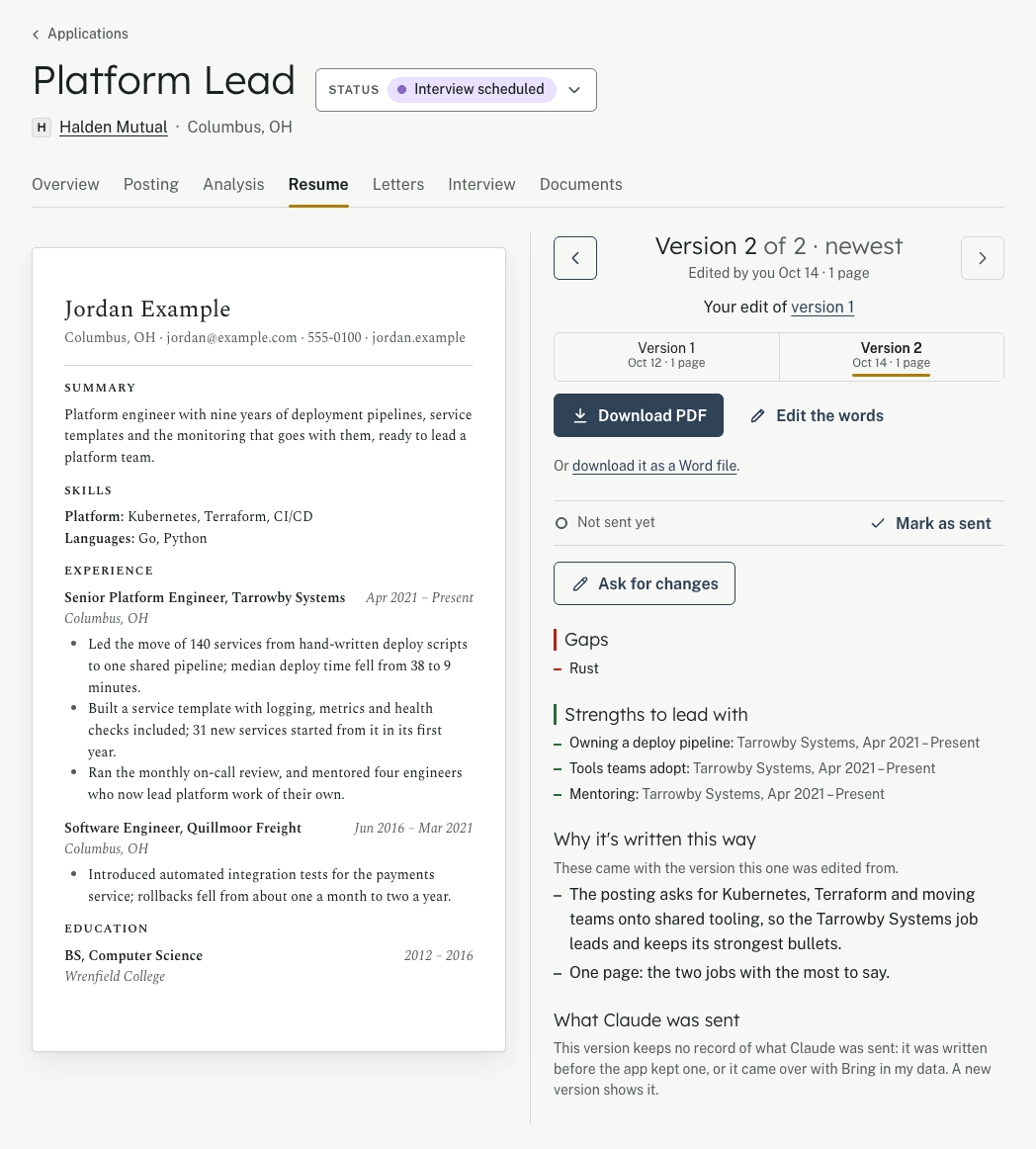
The Resume tab of an application for Platform Lead at Halden Mutual, status Interview scheduled, from the invented account Jordan Example. On the left, the resume on its paper. Beside it: version 2 of 2, edited by you on Oct 14, one page, based on version 1, with Download PDF; then the gaps, asked for in the posting and not yet in the career, and the strengths to lead with, each with where it is in the career record.

Outreach your way

A LinkedIn note, a text or a first e-mail, drafted from the application.

Hi Sam, I applied for the product designer role and would value ten minutes on how your team works with research.

A coach who knows your work

Ask anything about your search; the Coach answers from your own record.
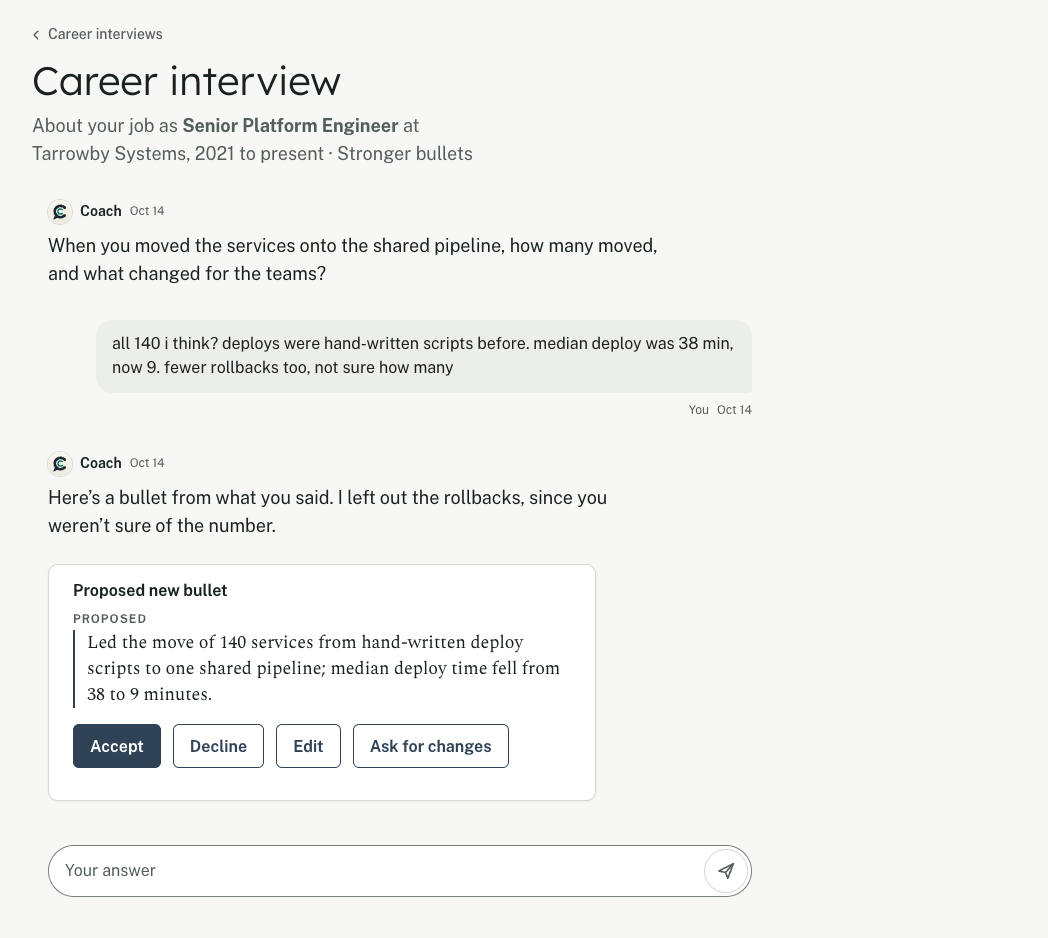
A career interview from the invented account Jordan Example, about the job Senior Platform Engineer at Tarrowby Systems. The Coach asks how many services moved onto the shared pipeline and what changed. Jordan answers roughly: all 140, the median deploy went from 38 minutes to 9, and fewer rollbacks, though not sure how many. The Coach proposes a new bullet, with Accept, Decline and Edit, and says it left out the rollbacks because Jordan wasn't sure of the number.

Interview practice

A brief for each interview, and questions to rehearse before you go in.

Question to rehearse

Tell me about a time research changed your design.

Your search, tracked

Every application, and what comes next.

The Applications list of the invented account Jordan Example: three applications in progress. This week: Platform Lead at Halden Mutual, Interview scheduled, a panel interview on Thursday, Oct 29; Senior Platform Engineer at Pellwick Labs, Applied, follow up on Friday, Oct 30. Later: Staff Engineer at Orrinwood Health, Phone screen on Tuesday, Nov 3.

One place for the whole search

What it does

  • Every application, and what comes next

    Each job you apply for, with its follow-ups when they're due.

  • A resume for each posting

    Paste a posting, see where you stand, and get a resume and cover letter written for it.

  • Practice before each interview

    Rehearse the questions this job is likely to ask, with notes on each answer.

  • A coach who knows your work

    Talk it through any time; the Coach knows your career and your week.

Three steps, by invitation

How you get in

  1. Ask for access

    Tell us your name, your e-mail and how you'd use it. It takes about two minutes.

  2. Get your invitation

    If you're invited, an e-mail brings a link that works once. You set your password there. Asking doesn't promise an invitation.

  3. Set up with the Coach

    Start the way that suits you. You check everything before it's saved.

    • Talk to the Coach
    • Bring your resume
    • Fill it in yourself

Your search stays yours

  • Your career, applications and notes are kept in your account, for you. No ads, and nothing is sold.
  • You can delete your account at any time, and ask for a copy of what's kept.
  • What the Coach reads is sent to Claude to write its replies. On Career Coach Dev's Claude account, Anthropic's terms say it isn't used to train Claude. On your own key, your key's terms apply.
  • This page sets no cookie and runs no script.

What it keeps and sends to Claude, and the terms

Ready when your next application is

Career Coach Dev is opening by invitation.

Ask for access

Cookies

Career Coach counts visits on its own servers to improve the site. No ads, nothing sold.

What each one keeps

Reject all: nothing about this visit is counted.

Anonymous only: each page you open adds one to today's totals, with the site you came from (its name, never its page) and your kind of device. No counting cookie; one small cookie remembers your pick, as it does for Reject all. A scrambled key stops you being counted twice in a day and is deleted when the day ends.

Accept all: totals, plus a cookie that lasts 6 months, works on Career Coach only and is never renewed. It shows which pages lead people to ask for access and who comes back. You can see or delete what it counted from Cookie settings.

If you don't pick, nothing is counted. What the privacy statement says